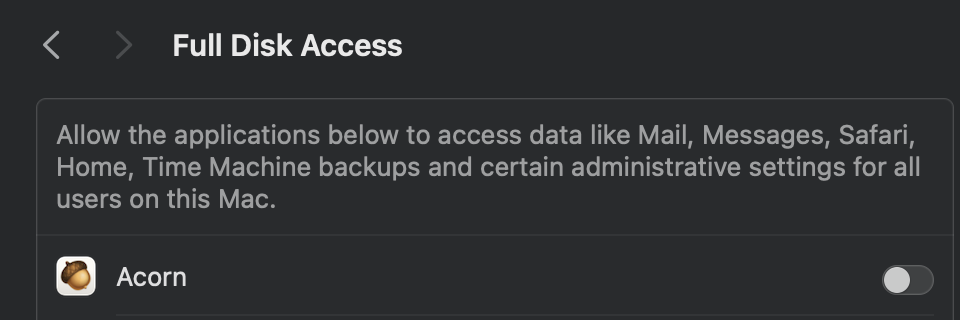
Hi all, I’ve been reviewing the “Full Disk Access” settings on my iMacs and was surprised to see that on my main system I had Acorn in there, but not enabled. Is there any reason why I might have needed to do that? I can’t remember doing it, or why. Does anyone else have Acorn enabled for Full Disk Access?
The only reference that I could find on these forums was this 2022 thread: Suddenly unable to open Acorn files through Applescript or Terminal , where Gus suggests using “Full Disk Access” for Acorn to see if resolves an issue of not being able to open certain files. I haven’t done any scripting with Acorn, which was the context for that thread, so I’m a bit stumped.
Not particularly important, though, if no-one has any comments that is fine.
Just checked the three Macs I have Acorn on, and they all had Acorn listed under Full Disk Access, and it wasn’t enabled on any of them, making me think I was never prompted. Gus mention scripting as a possible culprit - I make heavy use of Keyboard Maestro with Acorn, so that could be the cause in my case.
Thanks folks. So it doesn’t seem like Acorn appearing in my “Full Disk Access” list (not enabled) is unusual. I will assume that it hasn’t happened because of something foolish that I have done, and forgotten about.
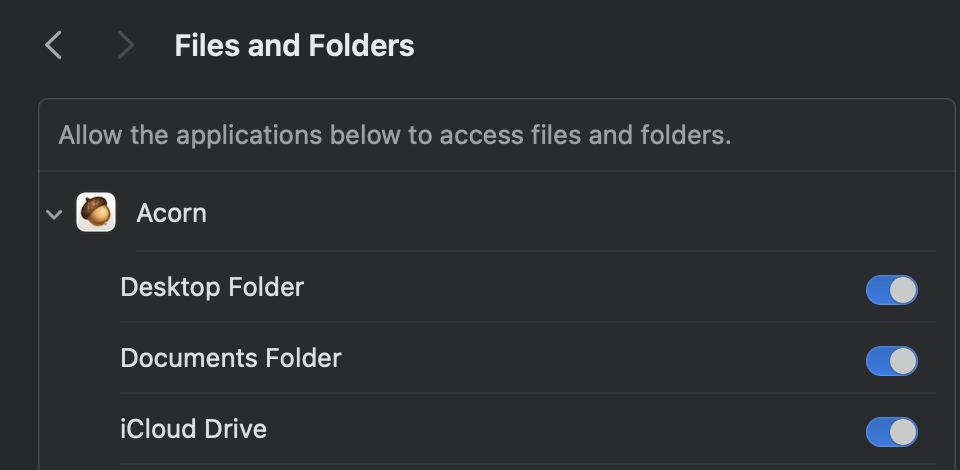
I finally got to the bottom of this. When using Acorn to open an image file from a “special” location like the Desktop or the Downloads folder, the macOS Mojave (and above) Transparency, Consent, and Control (TCC) system prompts you to grant permission to Acorn to allow access to that location. When you approve this, TCC creates an entry under System Preferences, Privacy & Security, Files and Folders for Acorn to access that location. It will also put Acorn under System Preferences, Privacy & Security, Full Disk Access - but not enabled.
I’ve deleted Acorn from both places, then opened a file from my Downloads or Desktop folder once again in Acorn, to confirm the above. The following screenshots are from my macOS Sonoma system (macOS 14.8.5).
Thanks for reporting back on this! Hopefully it will help other folks in the future understand what’s going on.
MacOS really wants to keep applications from opening up files in those locations. I suppose it makes sense that it would then put Acorn in the System Settings this way.
So, Acorn isn’t doing anything nefarious - MacOS is just doing what it would do to any app when the user tries to open up a file in the Downloads or Desktop folder.