I want to take a folder of images of different aspect ratios and scale them up or to cover a fixed image area – somewhat similar to macOS’s wallpaper “Fit to Screen” mode. The discussion Resize to Fit into 1920 x 1200 pixels? is close to what I’m looking for, so I tried using Rules. Aspect ratio is not a property I can use in a rule, so I’m unsure how to pull it off. Any suggestions?
I think you could achieve this with the scale node (scale by longest edge, set length to what you need finally) followed by the crop node (crop type “aspect ratio” and selecting the desired ratio). As long as you need one of the provided aspect ratios this should work. Of course, this does not work in general (eg portrait images processed to landscape may cut relevant parts of an image, but the wallpaper function does this too.
Unfortunately this approach won’t quite work for my use case – I’m targeting a specific resolution that isn’t a standard aspect ratio. Thanks for the suggestion.
Yep! I have a workflow for you that I think will work.
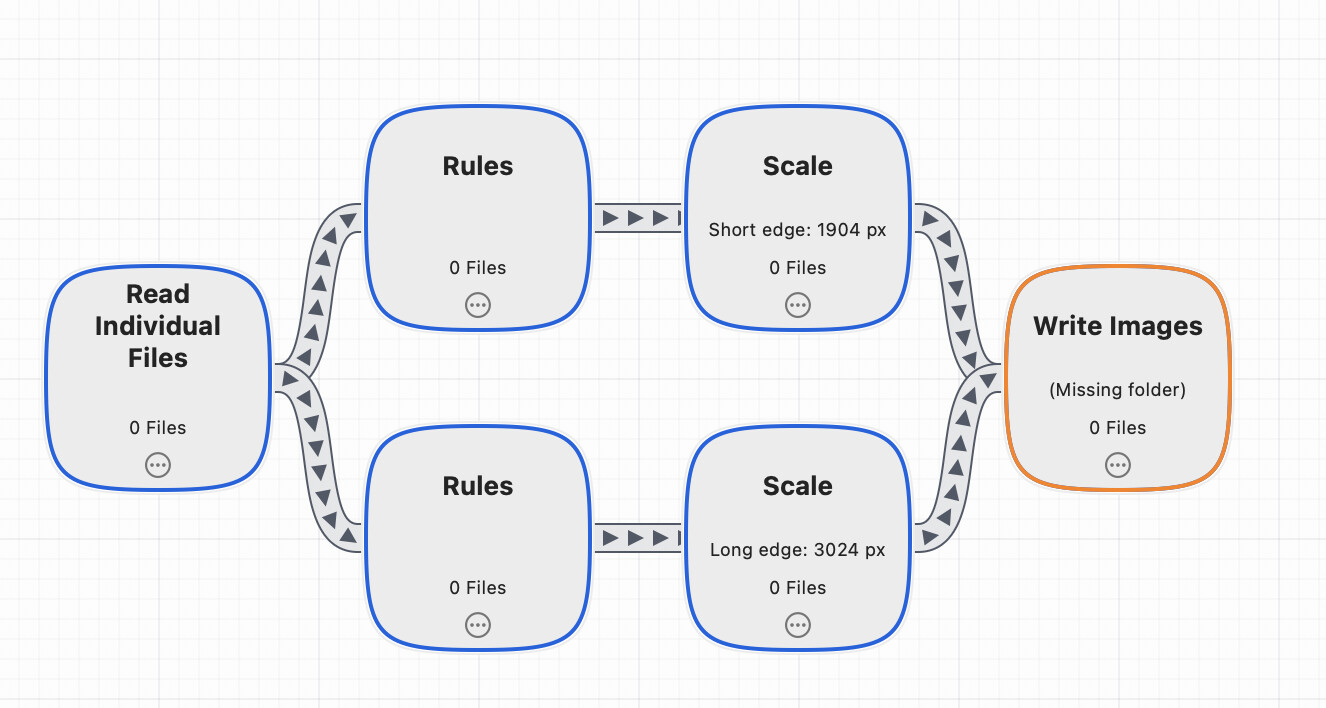
The trick is to use two Rules nodes, one that says “is landscape” and one that says “is not landscape”. Then you have a scale node after the landscape one which says the short edge is 1904, and a scale node after the "not landscape” saying long edge is 3024.Then you write them both to the same folder. I’ve attached a picture, as well as the workflow:
Thanks for this suggestion, it seems to be working as I intended.
It might be more intuitive if there was a node with this behavior of scaling while preserving proportions to cover a given size, but this solution accomplished my current objective.