Hello!
I’m a fresh RB user. My plan is to use RB for automating migration of my large media (mostly photos) into a reasonable folder structure.
_Import - an imput folder with deep sub-folder structure (up to 5 levels)
/input/
├── Phone_backup_2023/
│   ├── DCIM/Camera/IMG_20240315_143022.jpg (EXIF: 2024-03-15)
│   ├── DCIM/Camera/IMG_20240315_143055.jpg (EXIF: 2024-03-15)
│   └── WhatsApp/20231225_family_video.mov
├── Old_drive/
│   ├── Vacation 2022/
│   │   ├── beach1.jpg (File Creation: 2022-07-10)
│   │   ├── beach2.jpg (File Creation: 2022-07-10)
│   │   └── IMG_5432.mov (EXIF: 2022-07-12)
│   └── Photos/Random_mix/
│       ├── vacation.mp4 (no date)
│       ├── random_video.mp4 (no date)
│       └── 2021-05-03_birthday.jpg
├── USB_stick/
│   ├── random_photos/DSC_9876.jpg (EXIF: 2020-12-01)
│   └── videos/clip_final.avi (File Creation: 2019-08-20)
└── Desktop/
├── screenshot_no_date.png (no date)
└── 20240101_newyear.heic
_Export (test in this case) - an output folder with more reasonable sub-folder structure.
/output/
├── photo_valid/
│   ├── 2024/03/15/
│   │   ├── 20240315-000001.jpg
│   │   └── 20240315-000002.jpg
│   ├── 2024/01/01/20240101-000001.heic
│   ├── 2022/07/10/
│   │   ├── 20220710-000001.jpg
│   │   └── 20220710-000002.jpg
│   ├── 2021/05/03/20210503-000001.jpg
│   └── 2020/12/01/20201201-000001.jpg
├── video_valid/
│   ├── 2023/12/25/20231225-000001.mov
│   ├── 2022/07/12/
│   │   ├── 20220712-000001.mov
│   │   └── 20220712-000002.mov
│   └── 2019/08/20/
│       ├── 20190820-000001.avi
│       ├── 20190820-000002.avi
│       └── 20190820-000003.avi
├── photo_invalid/
│   └── screenshot_no_date-000001.png
└── video_invalid/
├── vacation-000001.mp4
└── random_video-000002.mp4
Here is my current workflow:
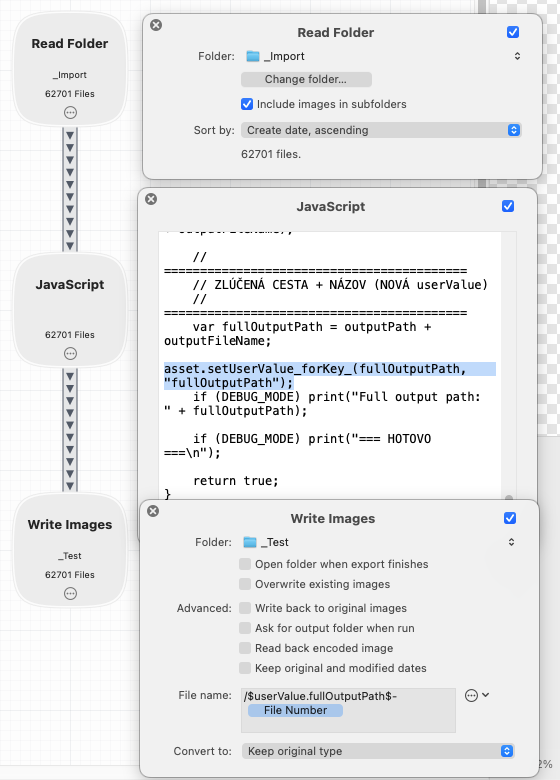
Read Folder node is configured to include images in subfolders. I also changed the sort by field to use create date asc.
JavaScript node is used for advanced filtering (mostly if file contains some date in metadata or file name) and is generating a $userValue.fullOutputPath variable which
is used in following Write Images node…this variable is following my sub-folder structure for output folder.
The issue I’m experiencing is that Write Images node implicitly inherits the input folder structure (within my read folder path). I expected that File name field should be relative to Folder field.
For example, if input file is saved in *Import/Vacation 2022/beach2.jpg
I would expect to write it into _*Test/photo_valid/2022/07/10/20220710-000001.jpg
Instead, the file is written into _Test/*Vacation 2022/*photo_valid/2022/07/10/20220710-1.jpg
I see two problems here:
- Write Images node is inheriting a relative path from source (Read Folder Node)
- FIle number token cannot be set to be for example 6 digits long and is not relative to a given folder, instead, it’s global within a batch - so I can’t simply have a continuous numbers in every output sub-folder.
Any ideas, how to overcome these issues?