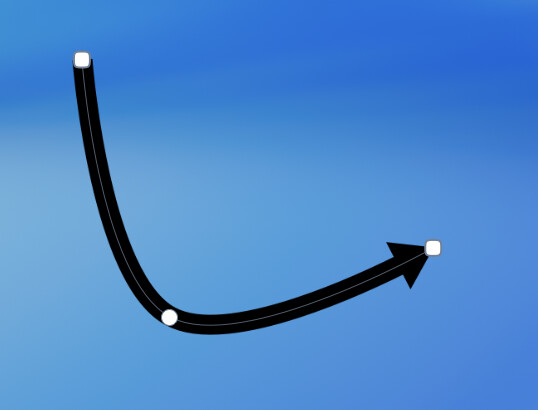
First off, a little butt-kissing - I’ve been an avid user of Acorn for years and years; I think since v3 or 4 possibly? I’ve ditched Photoshop for Acorn and never looked back - but there is one thing I really need (and I believe I’ve mentioned it before) - bezier arrows, like in the Apple Preview tool.
I do a lot of prototyping before building in css, and the arrow tool supplied just is not good for business designs, especially when I have to show the flow of individual elements - straight, solid fat lines with small heads just doesn’t look professional. I end up exporting to PNGs and then either using Preview to do the arrows and texts or Sketch (depending on the design - zooming is easier in Sketch).
I’d really love an option to use a bezier arrow tool like the one in Apple’s Preview app, just to bend them around the page and be able change the line colors, styles, arrowheads/tails and line widths as needed. I’d love to keep it all in Acorn instead of swapping around.
That’s a reasonable request, and something that is asked for now and again. I’ll see what I can do in a future release. (No promises, since it’s not a high priority - but it would be cool to have).
A related request: I create and modify a lot of scientific figures using Acorn and would really like to be able to create basic straight arrows by simply adding arrowheads to the start and/or end of line elements. It’s a feature found in almost every other app that creates line elements, including all the Office and Apple productivity ones. I basically want to be able to quickly and easily create an arrow like this: →
I’ve tried the arrow tool, but the default tapered shape and complex steps needed to convert it to a basic straight line and small arrowhead make it impractical for creating a simple arrow. It’s frustrating that Acorn can do 98% of what I need, but then I end up having to add arrow elements in another app because there’s no practical way to do what I need in Acorn. That would be understandable it was some bizarre functionality, but this seems like a significant omission of a basic tool. To be honest, it’s the one thing that keeps me checking out alternatives to Acorn.
I signed up just to say that I recently purchased Acorn and I am enjoying it. Being able to add an arrow head as an end cap to a line would be amazing.
Thank you for looking into this. Without more business-appropriate arrows, I need to move all designs to other apps, and I really don’t want to do that.
@ccgus I was excited to come back from vacation to see a new update to Acorn, only to see that – again, year after year – there’s no improvement to the Arrow tool. I’m really getting very frustrated with having to shift out of Acorn to do something every other app seems to do. Is an arrowhead on the end of the single line so hard to implement? There have been requests for this since 2017!
There’s been a lot of requests over the years! It’s just a matter of getting other things done first, and what other folks are requesting. There’s a very large queue.
It’s still on the list of course, and I want to add it myself.
I see. Well, it’s the same answer that I and others have gotten since 2017 (I think my first request was a couple years after that and again in this new follow-up from 2024). Somewhat disappointing tbh.
Same. Just saw another update today - top change: “You can now set or change the GPS metadata for your image in the File“. Yes I can see how that trumps updating the arrow tool.
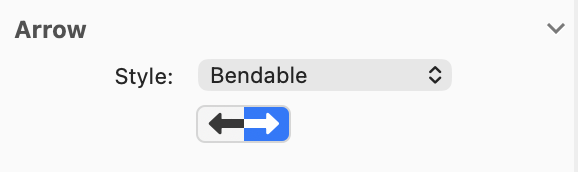
There’s two types: “Classic” and “Bendable”. The bendable type also has the option to have an arrow at the start or end or both.
The size of the arrow is controlled by the width of the stroke. There’s still a bunch of things to work out, as this is the second most complicated shape in Acorn’s tools (text is obviously first). But if you’d like to give it a try and provide feedback, please do.
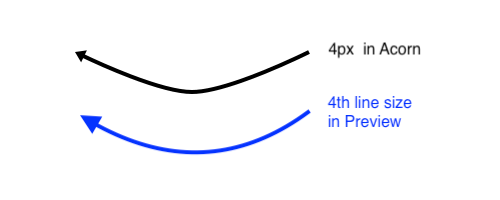
I have tried it and generally like it - very big improvement to the old arrows! Thank you, tho (of course) I do have a couple of comments - I’ve added an image for this:
The arrowhead is somewhat small for the stroke - I’m adding an image created in Acorn (black) and then in Preview (Blue). The scale for the head is feels disproportionately small for the line width. The line is at 4px (bendable line default in Acorn; tried to match line width with Preview).
The curve is, indeed, more a bend - like an elbow - than a curve. Is that the intention? To me it draws a lot of attention as it’s a bit different.
The sharper bend wasn’t intentional. I wanted it to be similar to what Preview does, and I missed that by a little bit. I’ve just updated Acorn so that the bend is a bit closer to what Preview does. I’ve also fixed the zoom scaled 25600% problem; it was a known issue, I just hadn’t gotten to it yet.