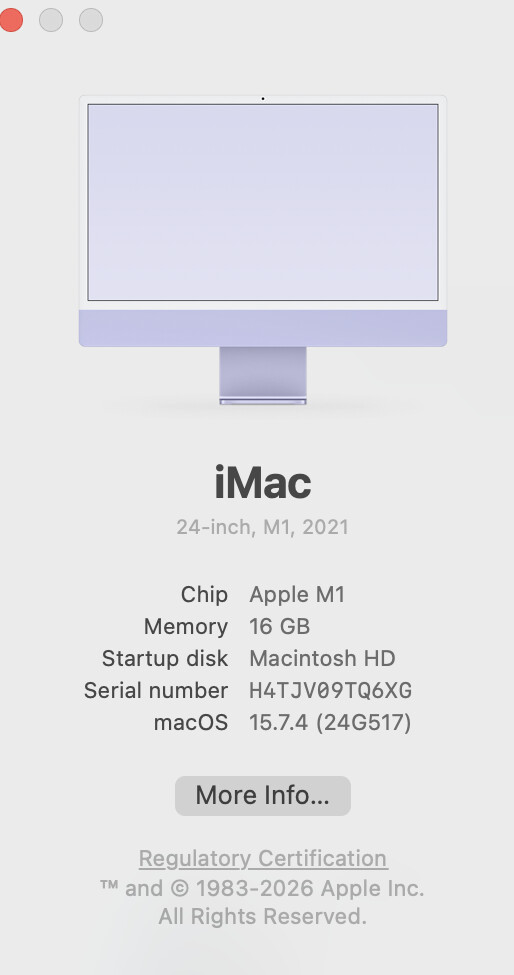
I have 8.6.. I can open it, and open files.. but I can not manipulate the files (smudge tool, paint brush)
Fortunately I have Version 8.1 which still works
Running macOS 15.7.4
I have 8.6.. I can open it, and open files.. but I can not manipulate the files (smudge tool, paint brush)
Fortunately I have Version 8.1 which still works
Running macOS 15.7.4
The brush rewrite is probably what is causing the issue for you. I tested it on MacOS 15 and all was well, but obviously something is tripping it up.
Is this a Apple Silicon Mac, or a x86 Mac?
And what kind of graphics card do you have in it?
How would I find this info?
Apple M1:
Chipset Model: Apple M1
Type: GPU
Bus: Built-In
Total Number of Cores: 8
Vendor: Apple (0x106b)
Metal Support: Metal 3
Displays:
iMac:
Display Type: Built-In Retina LCD
Resolution: Retina 4.5K (4480 x 2520)
Main Display: Yes
Mirror: Off
Online: Yes
Automatically Adjust Brightness: Yes
Connection Type: Internal
Thanks for that info.
It should be working just fine.
Can you open up Acorn from the Terminal app, use the brush tools that are failing, quit, and then copy and paste the output here?
To open Acorn from the Terminal, copy and paste the following lines into a shell window in the Terminal app (which is located in your /Applications/Utilities folder).
ACORN_APP_PATH=$(mdfind "kMDItemCFBundleIdentifier == 'com.flyingmeat.Acorn8'" | head -n 1)
"$ACORN_APP_PATH/Contents/MacOS/Acorn”
that doesn’t work which keep that in a folder ‘paint’ in my application folder
edit: I might have to re-download the program
I moved 8.6 into the app folder and and that string doesn’t work
is this something where I need to restart the computer after moving it into the Applications folder?
No, you don’t need to restart or anything. Here’s something else to try.
In the Terminal window, drag and drop the Acorn app into it while holding down the command key. This will automatically cd into its app bundle.
Then just copy and paste the following line and press enter:
./Contents/MacOS/Acorn
-gus
got that open, still can’t smudge or erase
But was anything printed out in Terminal after you did that? I’m wondering if any error messages printed out that might give me some insight as to what’s going on.
on ttys000
The default interactive shell is now zsh.
To update your account to use zsh, please run chsh -s /bin/zsh.
For more details, please visit Use zsh as the default shell on Mac - Apple Support.
iMac:~ librarymonkey27$ ACORN_APP_PATH=$(mdfind “kMDItemCFBundleIdentifier == ‘com.flyingmeat.Acorn8’” | head -n 1)
iMac:~ librarymonkey27$ "$ACORN_APP_PATH/Contents/MacOS/Acorn”
/Contents/MacOS/Acorn
cd /Applications/Acorn.app ;
iMac:~ librarymonkey27$ cd /Applications/Acorn.app ;
iMac:Acorn.app librarymonkey27$ /Contents/MacOS/Acorn
-bash: /Contents/MacOS/Acorn: No such file or directory
iMac:Acorn.app librarymonkey27$ /Contents/MacOS/Acorn
-bash: /Contents/MacOS/Acorn: No such file or directory
iMac:Acorn.app librarymonkey27$ ./Contents/MacOS/Acorn
2026-06-25 17:35:12.553 Acorn[4381:180579] FMMetalBrushDabber: Error Domain=FMMetalBrushDabberErrorDomain Code=1 “FMMetalBrushDabber requires a non-null IOSurface.” UserInfo={NSLocalizedDescription=FMMetalBrushDabber requires a non-null IOSurface.}
2026-06-25 17:35:12.553 Acorn[4381:180579] FMMetalBrushDabber beginSmudgeBatch failed: (null)
2026-06-25 17:35:14.492 Acorn[4381:180579] FMMetalBrushDabber: Error Domain=FMMetalBrushDabberErrorDomain Code=1 “FMMetalBrushDabber requires a non-null IOSurface.” UserInfo={NSLocalizedDescription=FMMetalBrushDabber requires a non-null IOSurface.}
2026-06-25 17:35:14.492 Acorn[4381:180579] FMMetalBrushDabber beginSmudgeBatch failed: (null)
2026-06-25 17:35:27.005 Acorn[4381:180579] FMMetalBrushDabber: Error Domain=FMMetalBrushDabberErrorDomain Code=1 “FMMetalBrushDabber requires a non-null IOSurface.” UserInfo={NSLocalizedDescription=FMMetalBrushDabber requires a non-null IOSurface.}
2026-06-25 17:35:27.005 Acorn[4381:180579] FMMetalBrushDabber beginBatch failed: (null)
2026-06-25 17:37:15.559 Acorn[4381:180579] FMMetalBrushDabber: Error Domain=FMMetalBrushDabberErrorDomain Code=1 “FMMetalBrushDabber requires a non-null IOSurface.” UserInfo={NSLocalizedDescription=FMMetalBrushDabber requires a non-null IOSurface.}
2026-06-25 17:37:15.559 Acorn[4381:180579] FMMetalBrushDabber beginSmudgeBatch failed: (null)
AHA!
If you open up Acorn’s Settings… window click on the fussy tab, and change the Backing: option to IOSurface, and then close and reopen your images, do things begin to work?